
Comparison and Buying Guides
Vibe Coding Keyboard vs Macro Pad: Which One Fits AI Workflows?
Jun
A vibe coding keyboard and a macro pad can look similar from a distance. Both are small devices with physical keys. Both can sit next to a main keyboard. Both promise faster control over repeated actions. The difference is in the starting point: a macro pad begins with programmability, while a vibe coding keyboard begins with an AI workflow.
If you are comparing the two, the right question is not “Which device has more power?” It is “How much setup do I want, and which repeated actions am I trying to make easier?”
Macro pads are general-purpose tools
A macro pad is usually a blank control surface. You decide what each key does. It might launch apps, run shortcuts, insert text snippets, control media, move windows, trigger scripts, or perform editor commands. That flexibility is the whole appeal.
For developers who enjoy configuration, a macro pad can be excellent. You can build a deeply personal setup around your editor, terminal, browser, and operating system. If your workflow changes often or you want a device that serves many apps, a macro pad may be the better buy.
The trade-off is that the device starts empty. The owner has to design the system, maintain it, and remember it later.
AI workflow keypads start from repeated agent actions
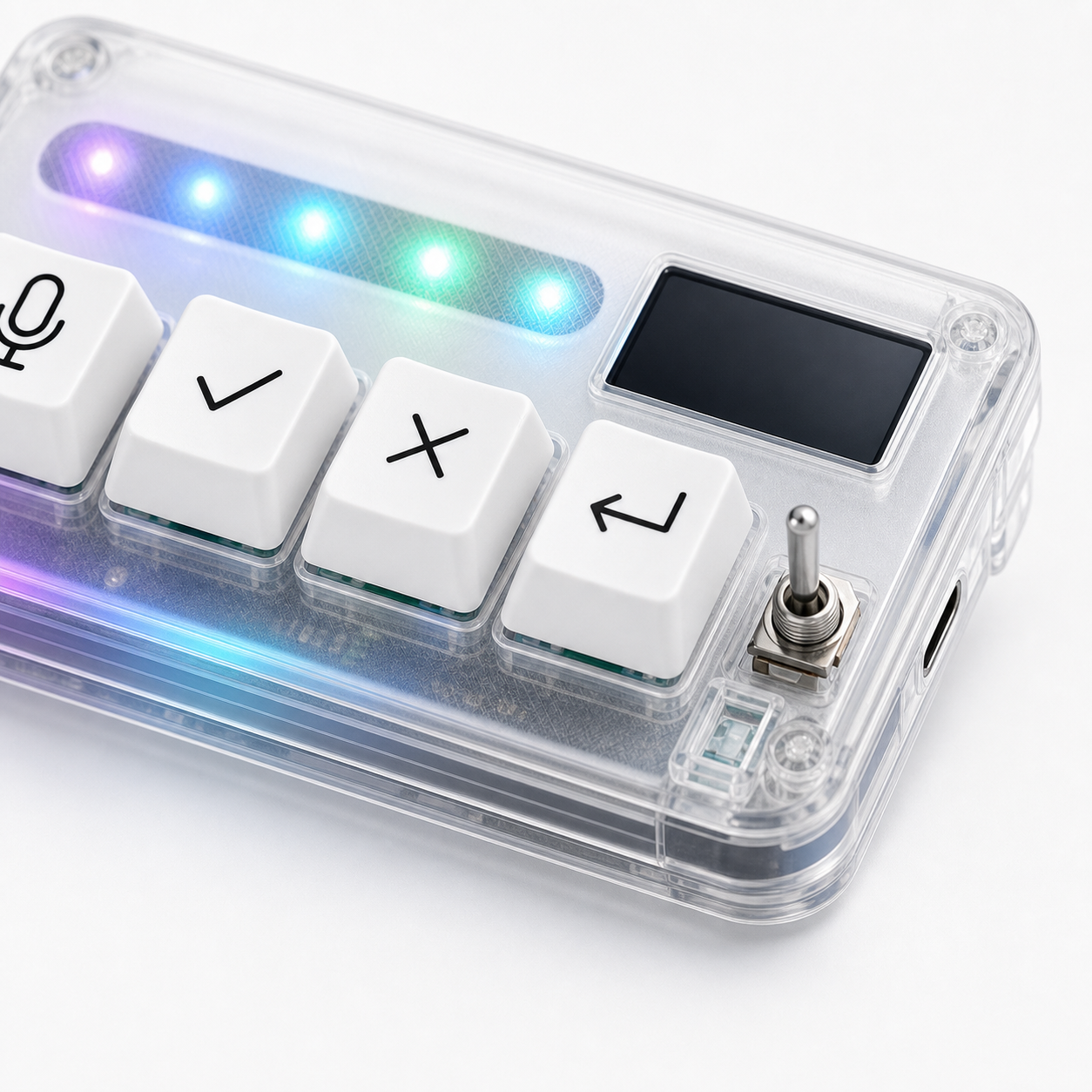
A vibe coding keyboard is narrower. It assumes the user is working with AI tools and needs fast control over a small set of repeated actions: microphone input, approval, cancellation, and return-style continuation. That narrower focus can be useful because the first useful mapping is already obvious.
This matters for people who do not want a weekend configuration project. They want a desk layer for AI coding, not a general macro platform. A focused device can feel faster because there is less to decide.
The downside is that it may not satisfy users who want dozens of custom commands. If your dream setup has many layers, app profiles, and scripts, a generic macro pad may give you more room.
Where macro pads win
Macro pads win when the workflow is broad. If you want one device for video calls, music, window management, code snippets, terminal commands, and AI tools, flexibility matters more than focus. More keys and deeper configuration can be valuable.
They also win when the user enjoys tinkering. A macro pad rewards people who like tuning layouts, testing shortcuts, labeling keys, and building custom automations. That can be a feature, not a burden.
Finally, macro pads can be easier to repurpose. If you stop using a specific AI tool, the device can become something else.
Where a vibe coding keyboard wins
A vibe coding keyboard wins when the repeated problem is clearly AI-agent control. If you mostly need to speak prompts, approve useful output, cancel bad direction, and submit the next turn, more keys may only add decision load.
It also wins when physical separation matters. A dedicated approve key feels different from a hidden keyboard shortcut. A dedicated cancel key can become a safety habit. A microphone key can make voice input feel deliberate instead of vague.
That is the HarnessKeys angle: compact four-key control, USB and Bluetooth support, a custom status screen, an RGB light bar, and language built around AI workflows rather than generic macros.
Setup effort should influence the decision
Buyers often underestimate setup effort. A macro pad can be powerful, but power arrives after mapping, testing, remembering, and adjusting. If you enjoy that, great. If you only want the core AI controls on your desk, setup effort can become friction.
A focused vibe coding keyboard is less open-ended. That can feel limiting for power users and relieving for everyone else. The right choice depends on whether you want a blank canvas or a starting workflow.
There is no moral victory in either direction. The best device is the one you will actually use after the first week.
Think about who maintains the setup
A macro pad can become excellent when someone keeps the mappings organized. That same strength can become a maintenance job. If shortcuts break after an app update or if a profile no longer matches your tool, you have to fix it.
A focused vibe coding keyboard asks for less ongoing design. The trade-off is that you accept a narrower product. For many AI-heavy users, that is fine because the repeated actions are stable even when the software around them changes.
A practical decision guide
Choose a macro pad if you want many commands, deep customization, cross-app control, and the freedom to build your own system. Choose a vibe coding keyboard if your main friction is repeated AI workflow control and you prefer fewer, clearer actions.
Choose neither if you do not yet know what action you would map. Observe your workflow first. If you only use AI tools casually, keyboard shortcuts may be enough. If you use AI agents daily and keep repeating the same speak-approve-cancel-continue loop, a focused device makes more sense.
HarnessKeys is not trying to be every macro pad. It is a small AI workflow keypad for a specific kind of buyer. Review the HarnessKeys product page, then check payment methods and shipping delivery if the four-key workflow matches your desk.
