
Comparison and Buying Guides
Four-Key Keypad vs 8-Key Macro Pad for Vibe Coding
Jun
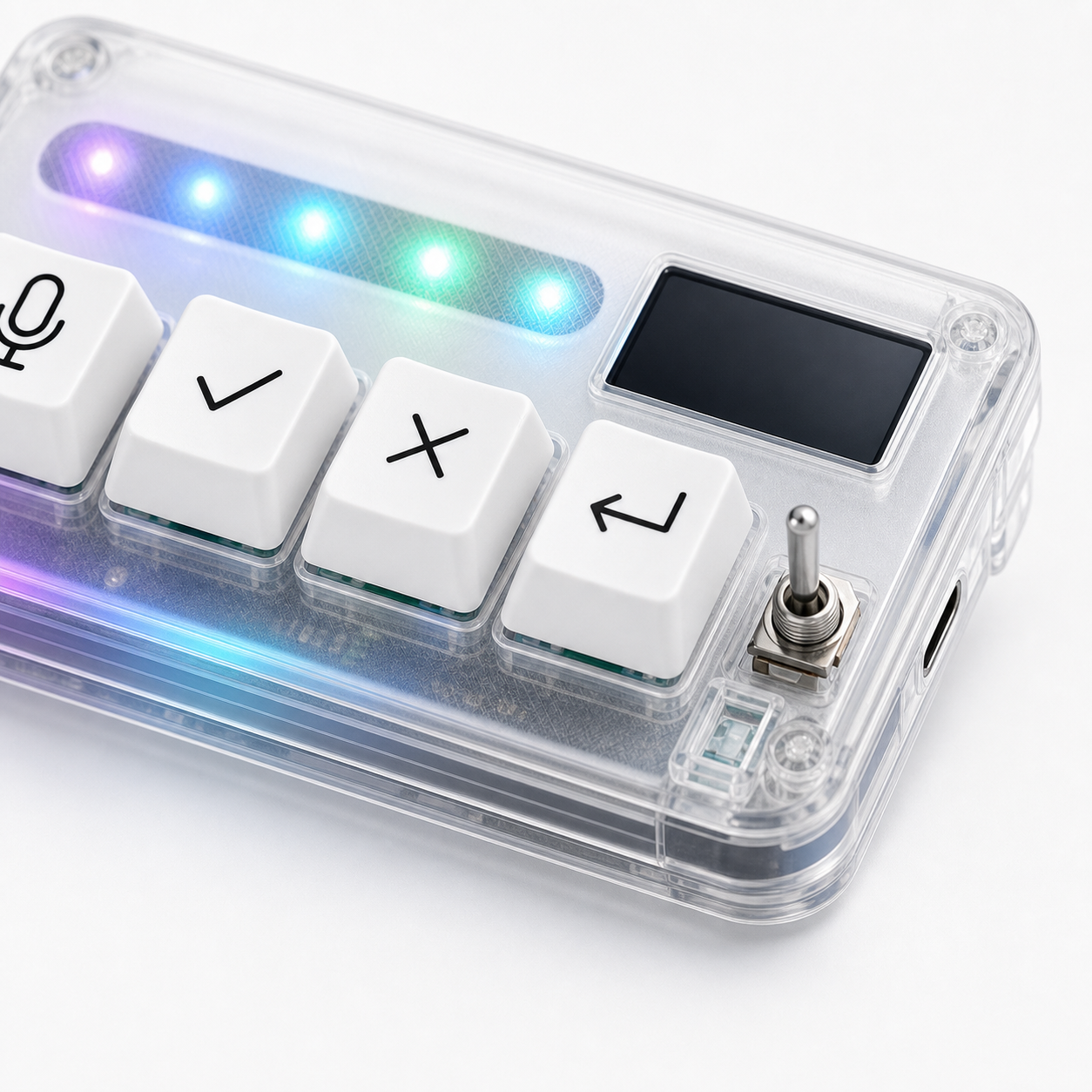
More keys are not automatically better for vibe coding. An 8-key macro pad gives you more room, but it also gives you more decisions to design, remember, and maintain. A four-key keypad can be better when the workflow is narrow and repeated: microphone, approve, cancel, and return.
The right choice depends on whether you need a compact AI control loop or a broader programmable surface.
Fewer actions can mean fewer mistakes
Four keys force discipline. Each key needs a job that matters. That limit makes the device easier to learn by touch, especially during AI coding sessions where attention should stay on the prompt, diff, or test output.
Fewer keys also reduce accidental meanings. The user is less likely to wonder which key approves, which key stops, or which key submits. The map is small enough to become muscle memory quickly.
This is valuable for AI workflows because approval and cancellation are judgment actions. They should feel clear, not buried among many options.
Eight keys help when the workflow is broader
An 8-key macro pad becomes useful when you genuinely have more repeated actions. Maybe you want separate keys for voice, approve, cancel, continue, run tests, open logs, paste a template, and switch profiles. If those actions are all daily habits, more keys can be practical.
More keys also give room for app-specific controls. A developer who likes building custom systems may enjoy that flexibility.
The risk is filling keys because they are available. Empty space can be uncomfortable, but unnecessary mappings create cognitive load.
Cognitive load is the hidden cost
Every extra key asks for memory. What does it do? Is it safe? Does it change by app? Does it require a modifier? What if focus is wrong? A larger pad can still be simple, but only if the user keeps the mapping disciplined.
AI coding already creates cognitive load through prompts, review, corrections, and tool state. Hardware should reduce that load. If the device becomes another thing to remember, it is moving in the wrong direction.
This is why a four-key layout can feel surprisingly strong. It covers the core loop without inviting constant redesign.
Desk space changes the decision
Desk footprint matters more than buyers expect. An 8-key pad may still be small, but it needs a reachable location. If it sits too far away, the extra keys do not help. If it crowds the mouse or main keyboard, it creates friction.
A four-key device can often sit closer to the natural hand path. That can make four keys more useful than eight keys in a poor position.
Before choosing, look at your desk honestly. Where would the device live during a two-hour coding session?
Growth path matters too
Some users should start small and grow later. If you are new to AI workflow hardware, four clear actions may be the right first step. After a few weeks, you may discover that you need more controls. Or you may find that four is enough.
Other users already know they need more. If you have a mature macro system and want AI controls as one layer inside it, an 8-key macro pad may be more appropriate.
The buying mistake is assuming your future workflow before observing your current one.
Use the unused-key test
If you are considering eight keys, write down what all eight would do before buying. Then mark which ones you would use every day. If only four actions feel obvious, a four-key device may be the more honest fit.
Unused keys are not harmless for everyone. They can invite constant remapping or create the feeling that the setup is unfinished. Some people enjoy that. Others find it distracting.
The best number of keys is the number that supports real habits without turning the hardware into a project.
Think about failure modes
With four keys, the main failure mode is limitation: you may eventually want more controls. With eight keys, the failure mode is confusion: you may create mappings that are too similar, too rare, or too risky to remember.
Neither failure mode is fatal. But they feel different. Limitation is easier to notice and solve later. Confusion can quietly make the whole device less trustworthy.
Why HarnessKeys chooses four
HarnessKeys chooses four keys because it is focused on the AI coding control loop. Microphone captures intent, approve moves reviewed output forward, cancel stops wrong direction, and return continues or submits the next turn. USB and Bluetooth support, a custom status screen, and an RGB light bar support that focused layout.
If you want a general-purpose macro pad, choose one. If you want a minimal AI workflow keypad where every key has a clear job, HarnessKeys is closer to that need.
Four keys are enough when they are the right four. Compare the hardware and current price on the HarnessKeys product page, then review payment methods and shipping delivery before deciding.
