
Comparison and Buying Guides
What to Look for in a Vibe Coding Keyboard Before You Buy
Jun
Before buying a vibe coding keyboard, look past the desk photo and ask how the device will behave during a real AI workflow. The best option is not the one with the loudest feature list. It is the one that makes repeated actions easier: voice input, approval, cancellation, and continuing the next prompt turn.
A good pre-purchase checklist should cover key actions, connection modes, status feedback, desk footprint, and the boring but important parts: support, payment, and shipping.
Check whether the key actions match your workflow
Start with the actions. What would you press every day? If you already use AI coding tools heavily, the repeated loop may be obvious: speak a prompt, approve an answer, cancel a wrong direction, and send the next instruction.
If those actions do not sound familiar, pause before buying. A vibe coding keyboard is most useful when it maps to real repetition. It is less useful when the buyer only wants a new object on the desk.
Do not judge by key count alone. Four keys can be enough if they are the right four.
Look for both reliable and flexible connection options
Connection mode matters because workflow controls need trust. USB is useful for setup and fixed desks. Bluetooth is useful for laptop setups, standing desks, and cable-free placement. A device that supports both gives you room to change the setup later.
Ask how you work. Do you stay at one desk all day? Do you move with a laptop? Do cables annoy you? Do you hate charging wireless devices? These practical preferences matter more than abstract specs.
The right connection mode is the one that disappears during work.
Status feedback should answer real questions
A small screen or light bar can be useful if it tells you something you need to know: connection state, active mode, listening status, or workflow feedback. It is less useful if it only adds decoration.
When evaluating a device, ask what the feedback would help you do. Would it make voice input feel safer? Would it reduce uncertainty about USB or Bluetooth state? Would it confirm that a mode is active?
Good status feedback is quiet, readable, and tied to action.
Desk footprint is part of usability
A workflow keypad must be easy to reach. If it sits behind a laptop stand or too far from the hand, it will not matter how good the mappings are. The device should fit the desk position where the repeated AI actions naturally happen.
Think about your main keyboard, mouse, trackpad, microphone, laptop stand, and cable route. A compact device has an advantage here, but placement still matters.
Before buying, choose the spot where it would live. If there is no comfortable spot, wait.
Check whether the product is too tied to one app
AI tools change quickly. A useful vibe coding keyboard should make sense beyond one specific app label. Microphone, approve, cancel, and return-style actions can remain useful across multiple AI tools because they reflect human workflow decisions.
If a device only makes sense with one software interface, ask what happens if you switch tools. Tool-specific hardware can still be useful, but it has a shorter value horizon.
A good purchase should survive at least some change in your AI stack.
Look for clear limits, not just promises
A trustworthy product page should make it possible to understand what the device does and does not do. Does it replace your main keyboard? Does it officially integrate with a specific AI tool? Does it require setup? What happens if you do not use voice input?
Clear limits help buyers make better decisions. A product that sounds perfect for everyone is usually not explaining the trade-offs carefully enough.
Support and shipping are part of the purchase
Hardware purchases do not end at checkout. You need to know how payment works, what shipping expectations are, and where to ask for help if the order has a problem. This is especially true for a specialized product that buyers may not be able to pick up locally.
Look for clear payment methods, shipping delivery information, refund and return policies, and a contact page. These pages do not make the product better, but they make the purchase easier to trust.
For a small hardware brand, clear support pages matter.
How HarnessKeys fits the checklist
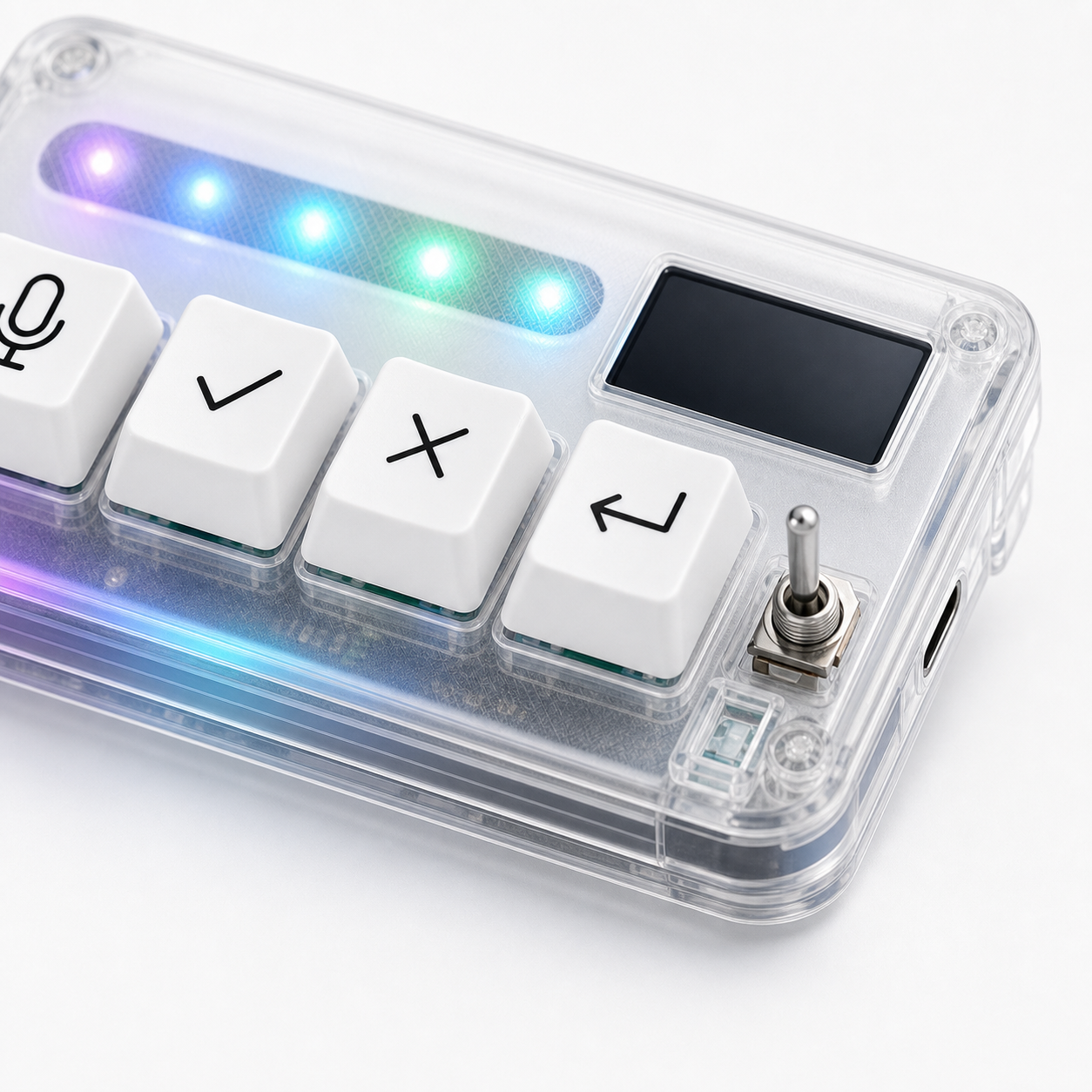
HarnessKeys is built around four AI workflow keys: microphone, approve, cancel, and return-style control. It supports USB and Bluetooth, includes a custom status screen, uses an RGB light bar, and has a compact transparent body for desk placement.
The current product price is $119.00. That price makes the buying question practical: will these four repeated controls improve enough daily sessions to justify the hardware? For casual users, maybe not. For daily AI coding users, the value is easier to see.
Use the checklist honestly. If the workflow fit is real, review the HarnessKeys product page. Before checkout, read payment methods and shipping delivery so the purchase path is clear.
