
Comparison and Buying Guides
Is a Vibe Coding Keyboard Worth It for Solo Developers?
Jun
A vibe coding keyboard can be worth it for solo developers, but not automatically. Solo developers have to justify every desk purchase because there is no team budget hiding the cost. The device needs to save attention, reduce repeated friction, or make AI coding sessions easier to control.
The honest answer depends on daily repetition. If AI tools are occasional helpers, wait. If AI agents are part of your everyday coding loop, a small physical control layer can be easier to justify.
Start with cost versus repetition
A $119.00 hardware purchase should be measured against repeated use, not novelty. Ask how many times per day you approve AI output, cancel wrong directions, submit prompts, or type context that could be spoken. If the answer is “rarely,” the device is probably not urgent.
If the answer is “all day,” the calculation changes. Small repeated frictions become expensive when they interrupt every session. A dedicated control does not need to save hours at once. It needs to make many small decisions cleaner.
Solo developers feel that more sharply because they are the planner, builder, reviewer, and operator.
Daily usage threshold matters
A practical threshold is simple: would you use the device in most serious coding sessions? If yes, it may be worth considering. If it would sit unused unless you remembered to force it, wait.
Try observing a week of work. Count how often you use AI tools for real tasks, not demos. Count how often you reach for mouse controls or type long corrective prompts. That evidence is better than guessing.
Hardware earns its place through boring daily use.
Voice workflows increase the value
Solo developers often carry a lot of context in their heads. Voice input can help get that context into the AI tool before it gets shortened into a tired prompt. A microphone key makes that voice moment more deliberate.
If you already like speaking prompts, a vibe coding keyboard becomes more useful. If you dislike voice input or work in shared spaces where speaking is awkward, the value may depend more on approve, cancel, and return controls.
Voice is not mandatory, but it can make the device feel less like a macro pad and more like an AI workflow layer.
Mistakes avoided count as value
Productivity hardware is often judged by speed, but avoided mistakes matter too. A clear cancel key can stop an agent before it edits too broadly. A distinct approve key can make acceptance feel intentional. A separate return-style key can reduce accidental prompt submission.
For solo developers, avoided mistakes are valuable because there may be no teammate catching them later. You are the review process.
If physical controls help you stay more deliberate with AI output, the value is not only faster work. It is cleaner judgment.
When solo developers should wait
Wait if you are still unsure which AI tool you use most. Wait if you rarely prompt during coding. Wait if your workflow problem is unclear requirements, poor tests, or not reviewing generated code. Hardware will not fix those issues.
Also wait if your desk is already uncomfortable or crowded. A new device should not become one more object you have to work around.
The best time to buy is after the repeated friction is obvious.
Compare it with cheaper fixes first
A solo developer should check the cheap fixes before buying hardware. Better prompt templates, cleaner editor shortcuts, a better microphone habit, or moving the AI panel can solve some of the same friction. If those fixes work, great.
The keypad becomes more compelling when the cheap fixes do not address the physical loop. If you still want a dedicated yes, stop, voice, and next-turn control after cleaning up the software workflow, the hardware case is stronger.
This is a healthy buying filter. It prevents the device from becoming a substitute for workflow design.
Think about attention as the scarce resource
Solo developers are not only buying speed. They are protecting attention. A small device is worth more when it removes a repeated attention leak: finding an approve button, stopping a wrong generation, or typing the same style of correction again.
If the device only makes the desk look better, the value is weak. If it helps preserve the thread of thought during AI-heavy work, the value is stronger.
Where HarnessKeys fits the solo workflow
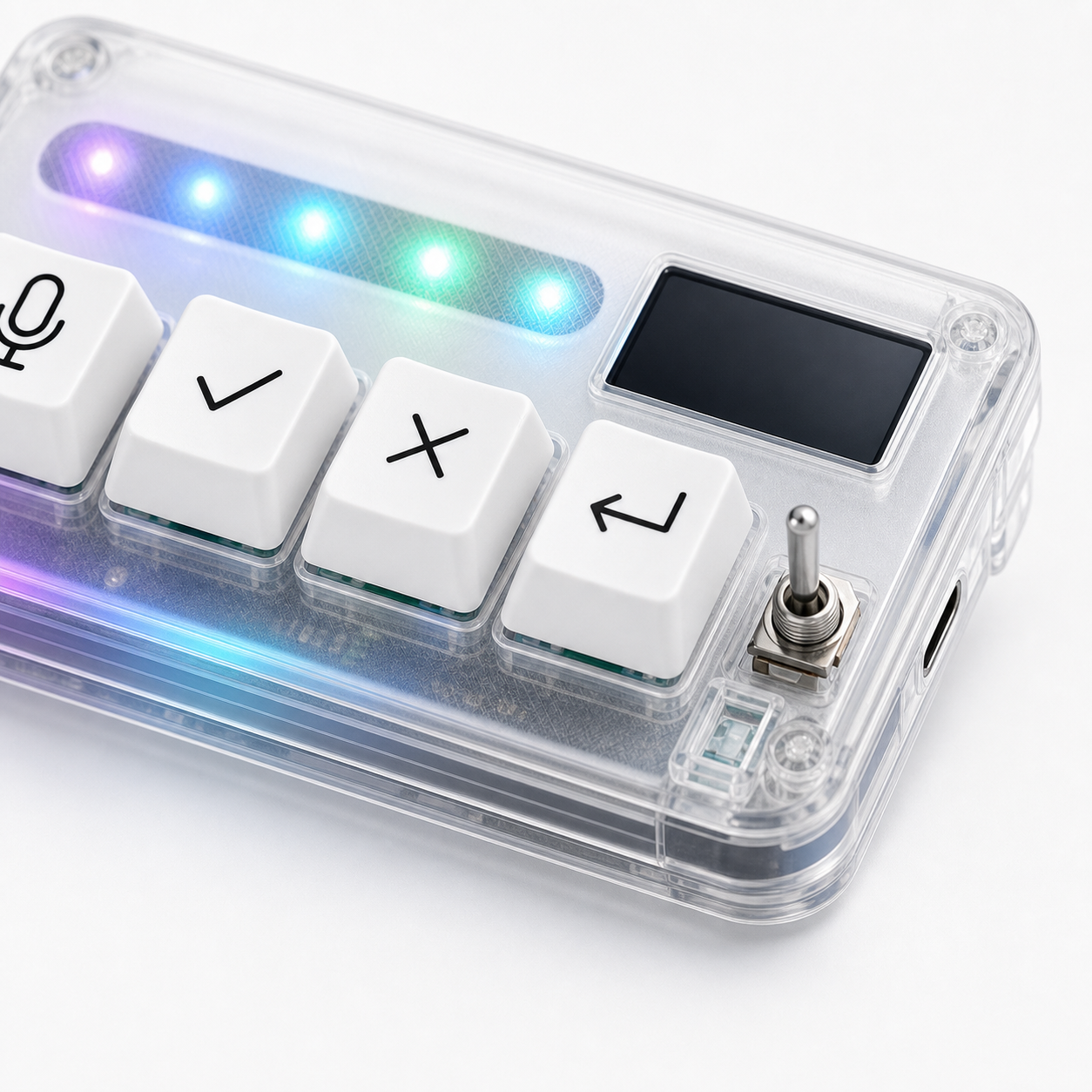
HarnessKeys is a compact option for solo developers who already feel the AI control loop repeating. Its four keys cover microphone, approve, cancel, and return-style actions. It supports USB and Bluetooth, includes a custom status screen, has an RGB light bar, and keeps the footprint small.
It is not a magic productivity upgrade. It is a physical layer for a workflow you already use. That distinction matters when spending your own money.
If the daily-use test passes, compare the device details on the HarnessKeys product page. Then check payment methods and shipping delivery so the practical purchase path is clear.
