
Comparison and Buying Guides
AI Workflow Keypad Buying Guide for Cursor Claude Code and Codex Users
Jun
Cursor, Claude Code, Codex, ChatGPT, and other AI coding tools all have different interfaces, but they create similar control problems. Users need to provide context, start prompts, approve useful output, stop wrong directions, and continue to the next step. An AI workflow keypad should be judged by that tool-agnostic loop.
HarnessKeys is independent hardware. It is not an official accessory for Cursor, Claude, Codex, ChatGPT, or any other AI platform. That matters because buyers should evaluate it as a desk control layer, not as a platform-specific plugin.
Start with the tool-agnostic workflow
Instead of asking whether a keypad is “for Cursor” or “for Claude,” ask what action you repeat inside the tool. Do you speak longer prompts? Approve suggestions? Cancel agent runs? Submit follow-up instructions? Those actions are more stable than any one product’s interface.
AI tools change quickly. A workflow built around human decisions lasts longer than a workflow built around one button label in one app.
A good keypad should support the control loop even as software changes.
Voice input behaves differently across tools
Voice input may land in different places depending on the tool: an editor prompt field, a browser chat box, a desktop app, or a separate transcription flow. Before buying hardware for voice, think about where the text should go and whether you want to review it before sending.
A microphone key is useful when it creates a deliberate capture moment. It is less useful if the voice path is unclear or unreliable.
For Cursor, Claude, Codex, or any AI tool, test the voice workflow with harmless prompts before using it for serious changes.
Approval loops are the real common ground
Different tools phrase approval differently. One may ask to apply changes. Another may ask to continue. Another may present a suggested diff. The underlying decision is similar: do you want this AI step to move forward?
A dedicated approve key is useful when approvals happen often and the user still reviews output first. It should not become a blind accept-all habit.
That review-first principle applies regardless of which AI coding tool you use.
Cancellation is equally important
AI agents can drift in any tool. They may broaden scope, edit the wrong area, or keep generating after the useful part is done. A fast cancel action helps the user stop early and redirect.
This is especially important in tools that can perform multi-step actions. The more autonomous the agent feels, the more valuable a clear stop signal becomes.
When comparing hardware, do not only ask how it helps you approve. Ask how it helps you stop.
Shortcut differences can affect setup
Each AI tool has its own shortcut behavior, focus model, and confirmation UI. A physical keypad may need different mappings depending on where the prompt field lives and how the tool handles Enter, Escape, or approval buttons.
Do not assume one mapping will work perfectly everywhere. Test microphone, approve, cancel, and return-style actions in each tool you use. Keep the mappings conservative until you trust them.
A hardware layer is strongest when it simplifies differences without pretending they do not exist.
Do not assume official integration
Buyers sometimes search for hardware by tool name and assume that a keypad must be officially integrated with that tool. That assumption can cause disappointment. Independent hardware should be evaluated by what it can reliably trigger in your actual setup, not by imagined platform endorsement.
For Cursor, Claude Code, Codex, and similar tools, the practical test is local: can you start voice capture, submit a prompt, approve a step, or cancel a direction in the way you expect? If yes, the workflow may be useful. If no, the brand name in the search query does not help.
Tool-agnostic does not mean no setup. It means the product is designed around common AI workflow actions rather than one company’s interface.
Build one control language across tools
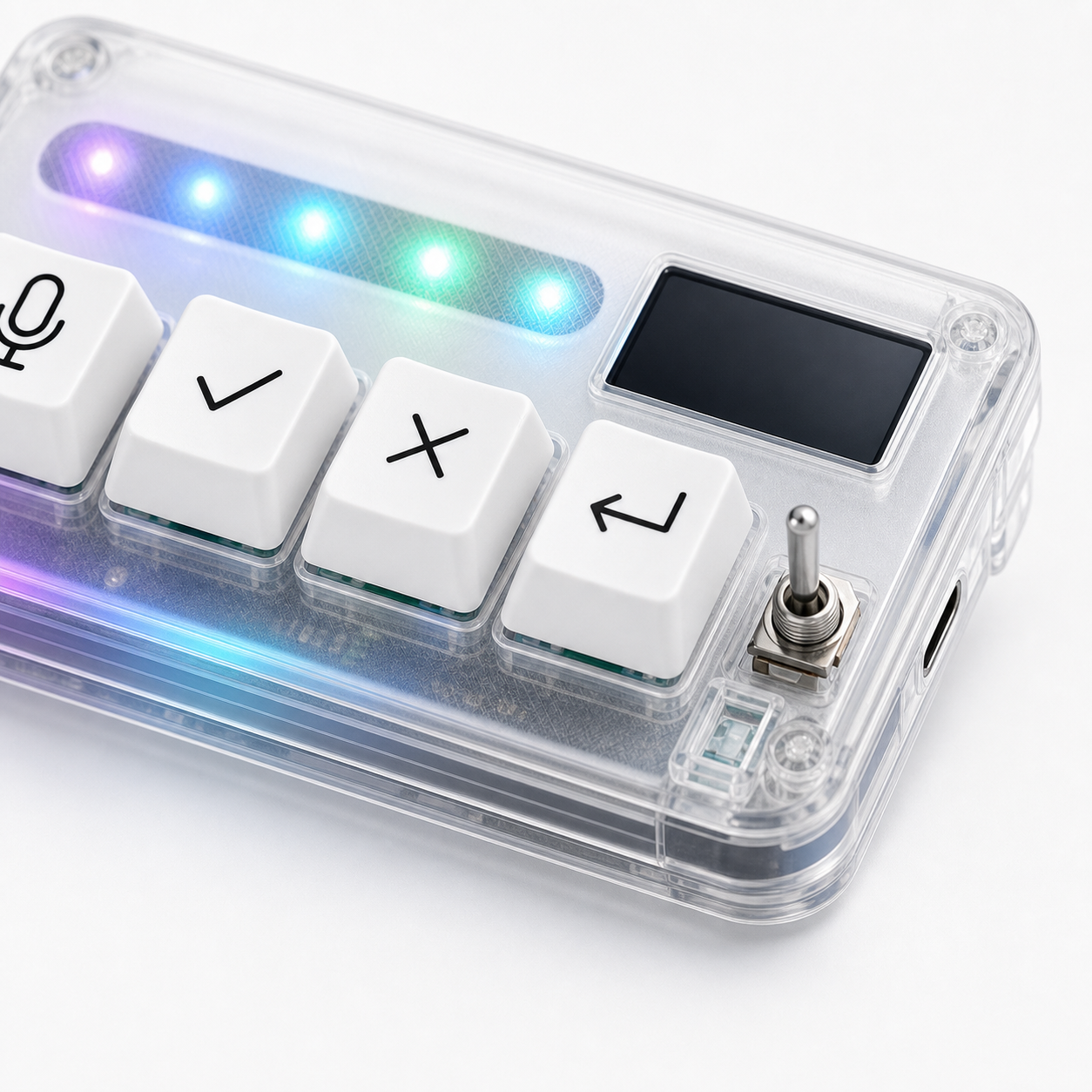
The strongest reason to use a keypad across Cursor, Claude, Codex, and other tools is consistency. Even if the software interfaces differ, your hand can learn the same control language: mic for input, check for approval, X for stop, return for next turn.
That consistency reduces the feeling that every AI tool requires a different body habit. It also makes switching tools less disruptive when the underlying task is still coding, reviewing, or prompting.
Where HarnessKeys fits for Cursor Claude and Codex users
HarnessKeys focuses on four common AI workflow actions: microphone, approve, cancel, and return-style control. It supports USB and Bluetooth, includes a custom status screen, uses an RGB light bar, and keeps the footprint compact. That makes it a tool-agnostic control surface for AI-heavy desks.
It is best for users who already feel the repeated loop across tools. It is less useful for someone who uses one AI chat occasionally and does not need physical controls.
If you use Cursor, Claude, Codex, or similar tools daily, compare the loop against the HarnessKeys product page. Before buying, check payment methods and shipping delivery for the practical order details.
