
Comparison and Buying Guides
Vibe Coding Keyboard Alternatives: What to Compare Before Choosing
Jun
Vibe coding keyboard alternatives include generic macro pads, Stream Deck-style visual controllers, voice software alone, DIY devices, and ordinary keyboard shortcuts. None of these options is automatically better or worse. The right choice depends on the pain point you are actually trying to solve.
Before choosing HarnessKeys or an alternative, name the friction. Is it long prompt typing? Approval clicks? Slow cancellation? Desk clutter? Too many shortcuts? The answer should guide the product category.
Generic macro pads are best for custom builders
A generic macro pad is a strong alternative if you want full control over mappings. You can assign keys to app shortcuts, scripts, snippets, test commands, window layouts, or AI actions. For people who enjoy configuration, this is a real advantage.
The downside is setup effort. A macro pad usually does not arrive with an AI workflow story. You have to create one. If that sounds fun, choose the macro pad. If it sounds like chores, a focused vibe coding keyboard may fit better.
Macro pads are flexible. They are not always simpler.
Stream Deck-style devices are best for visual command menus
Visual button decks are excellent when labels, profiles, folders, and many commands matter. They work well for broad creator workflows and can also help developers run scripts, open tools, or manage projects.
For AI coding, the question is whether you need a visual menu or a tactile loop. If you need twenty labeled commands, a visual deck is compelling. If you mostly need speak, approve, cancel, and continue, it may be more than the workflow needs.
Looking down is fine for command selection. It is less ideal for repeated yes/no control during code review.
Voice software alone can be enough
If your main problem is typing long prompts, voice software alone may solve it. You might not need hardware. A good microphone habit, push-to-talk shortcut, and transcript review process can reduce prompt fatigue.
The limitation is control. Voice software may help you speak instructions, but it does not necessarily make approve, cancel, and return-style actions easier by touch.
Choose voice-only if prompting is the whole issue. Consider hardware if steering the session is also a problem.
DIY devices fit technical hobbyists
A DIY keypad or microcontroller project can be rewarding. You can choose the switches, case, firmware, layout, and mappings. For builders, that control is part of the fun.
DIY is not the fastest path for everyone. It can involve parts, firmware, debugging, enclosures, and maintenance. If the goal is to improve AI workflow this week, a finished product may be easier.
Choose DIY when the project itself is valuable to you. Choose a finished keypad when the workflow is the priority.
Keyboard shortcuts remain the cheapest alternative
Shortcuts cost nothing if your tools already support them. For many users, they are enough. Map push-to-talk, learn the approve command, use cancel shortcuts, and keep the prompt workflow clean.
If shortcuts feel natural, use them. If they become hard to remember, focus-dependent, or too crowded on the main keyboard, a physical device may become more attractive.
The cheapest option is best when it solves the actual problem.
Do nothing if the workflow is not ready
One honest alternative is not buying anything yet. If you are still trying different AI tools, still unsure whether voice input fits your environment, or only occasionally use AI for coding, waiting can be the best choice.
A hardware purchase works best after the repeated pattern is visible. If you cannot name the action that bothers you, a new device may only add another object to the desk.
Waiting is not indecision. It is a way to avoid solving a vague problem with hardware.
Compare alternatives by failure mode
Each alternative fails differently. A macro pad can become too much setup. A visual deck can ask for too much looking down. Voice-only can leave approval and cancellation awkward. DIY can become a project. Shortcuts can become hidden or focus-dependent.
HarnessKeys can fail too if the buyer needs many controls or does not repeat the four AI workflow actions. Comparing failure modes is more useful than comparing feature lists, because it shows which trade-off you are willing to live with.
This approach also keeps the comparison fair. HarnessKeys is not trying to beat every alternative at every task. It is trying to solve one focused problem: repeated AI workflow control in a compact physical layout.
Choosing by pain point
Choose a generic macro pad for broad customization. Choose a visual deck for many labeled commands. Choose voice-only for prompt typing fatigue. Choose DIY for maximum control and a building project. Choose HarnessKeys if the main pain is repeated AI workflow control in a compact four-key layout.
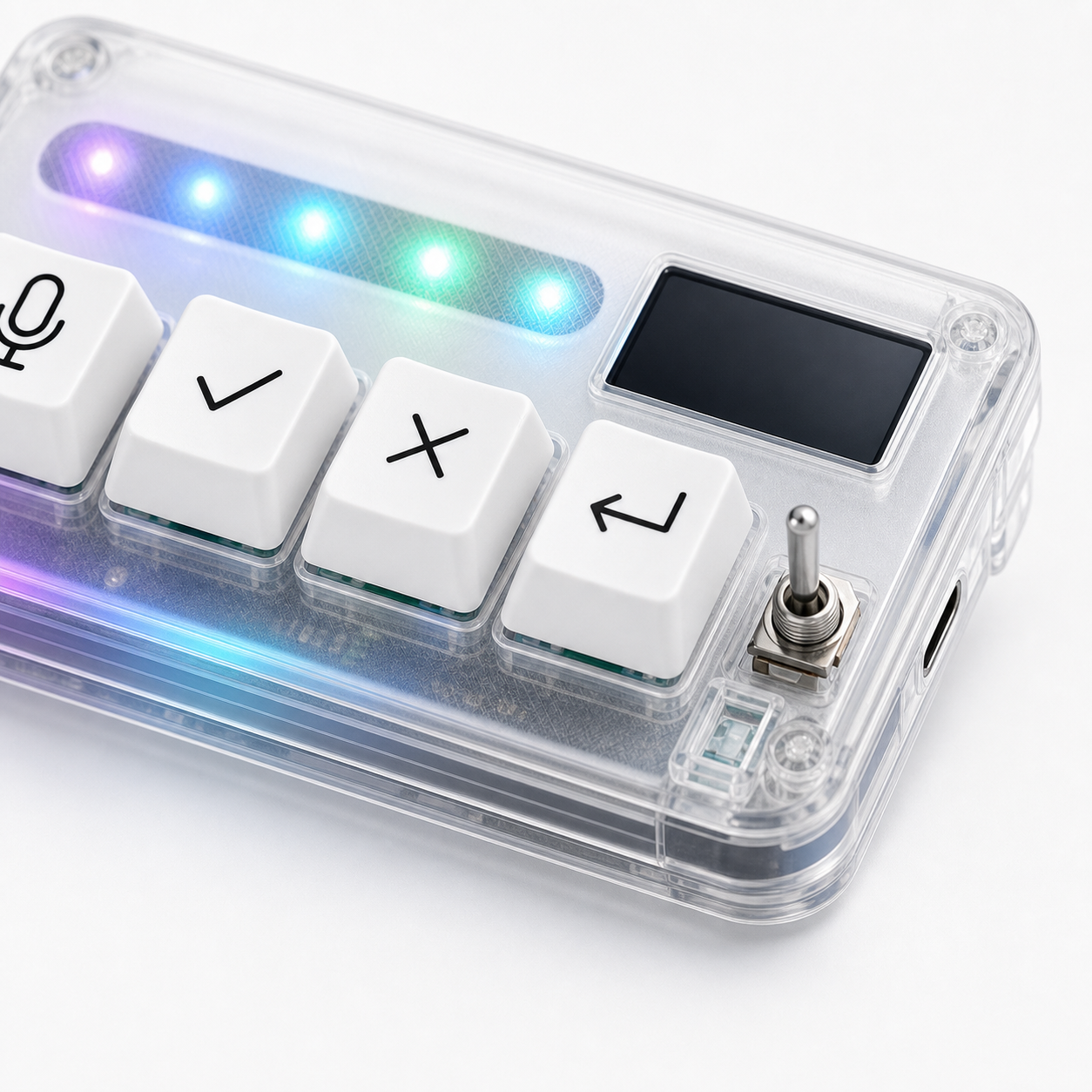
HarnessKeys combines microphone, approve, cancel, and return-style keys with USB and Bluetooth support, a custom status screen, an RGB light bar, and a transparent compact body. It is specialized, which is either the reason to buy it or the reason to choose an alternative.
Compare your pain point against the HarnessKeys product page. If it matches, check payment methods and shipping delivery before ordering.
