
Workflow Design
How to Build Muscle Memory for AI Coding Controls
Jun
A workflow keypad only helps if the actions become easy to perform without conscious effort. That is muscle memory. In AI coding, muscle memory is not just about speed. It is about reducing hesitation during repeated decisions: speak, approve, cancel, continue.
If you have to stop and remember what a key does, the device has not become part of the workflow yet. That is normal at the beginning. The goal is to choose stable mappings, practice them in real sessions, and avoid overloading keys before the basics feel natural.
Choose mappings you can explain in four words
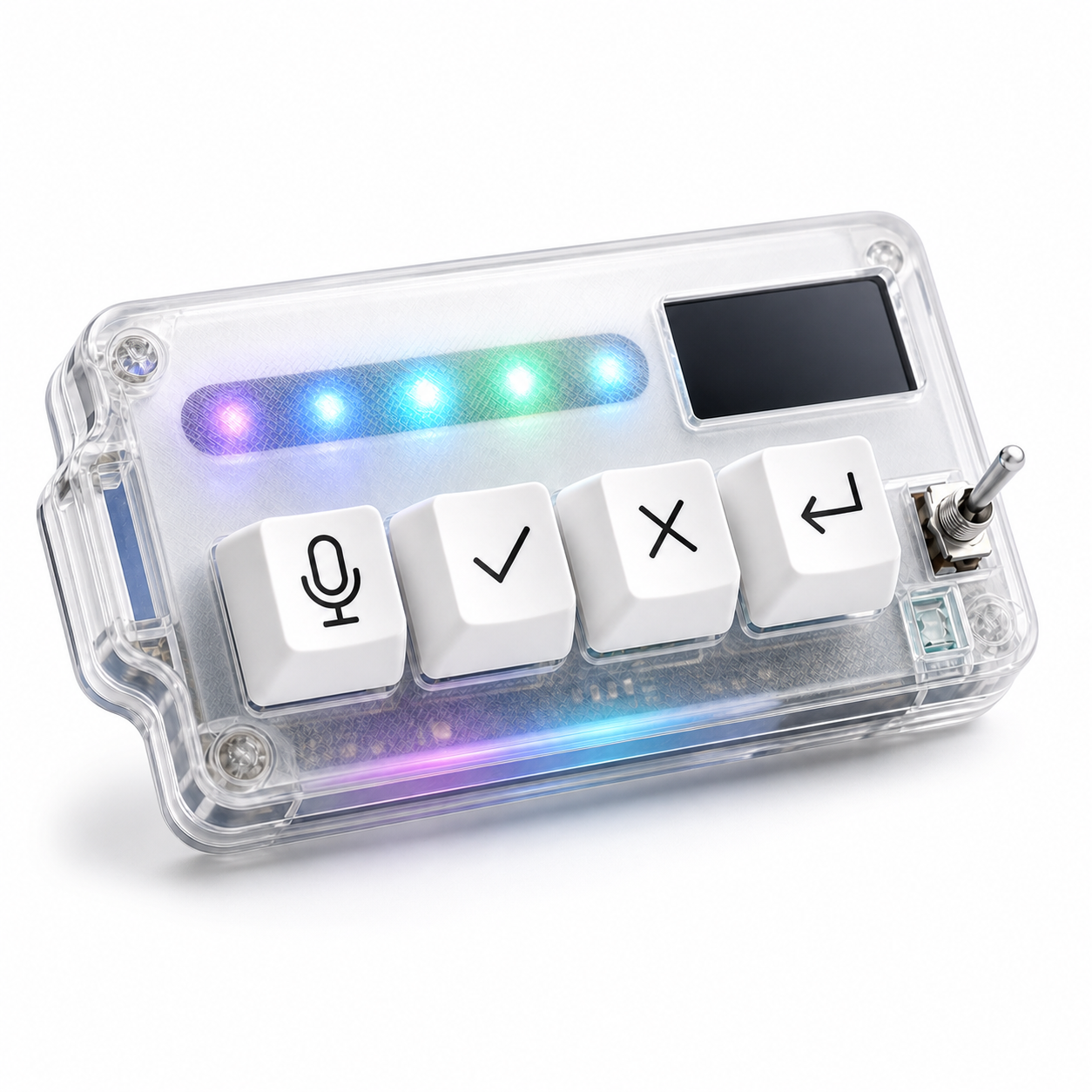
The easiest mappings to learn have plain names. Mic captures prompt. Check approves. X cancels. Return sends next turn. If a mapping requires a paragraph to explain, it will be hard to remember during a busy coding session.
Short names matter because the hand learns meaning through repetition. A clear mapping becomes a reflex. A clever mapping becomes a puzzle.
Start with actions that already happen often. Do not invent a workflow just because the key exists.
One useful test is the “tired naming” test. If you can still name the key’s job correctly at the end of a long workday, the mapping is probably simple enough. If you need to remember a profile, mode, or exception, the setup may be too clever for muscle memory.
Practice during real work, not only setup
Configuration screens can trick you. A mapping can look perfect when you are calmly testing it, then disappear from memory during real debugging. Muscle memory forms during actual use: reading diffs, correcting prompts, stopping bad responses, and sending follow-ups.
Use the keypad on one real project for a week. Do not switch every mapping after each small annoyance. Give your hand time to learn. At the end of the week, you will know which actions became natural and which ones still caused hesitation.
The first goal is consistency, not optimization.
During the first week, avoid judging the keypad by novelty. New hardware always feels interesting for a day. The real question is whether you still reach for the same controls when you are debugging, interrupted, or moving quickly through small AI turns.
Avoid overloading one key
One key should not mean five things depending on a hidden state you barely remember. Layers, long presses, double taps, and app-specific modes can be useful later, but they slow learning at the beginning.
Overloaded keys create doubt. Is this press going to submit, confirm, or insert a newline? Is cancel stopping generation or closing a panel? If the user has to ask, the mapping is not ready for muscle memory.
Keep the first month simple. One key, one primary meaning.
This is especially important for approve and cancel. Those keys represent opposite decisions. If either key changes meaning based on focus or app state, the user may hesitate exactly when the workflow needs confidence.
Measure hesitation honestly
You can tell whether muscle memory is forming by watching hesitation. Do you look down before pressing the key? Do you reach for the mouse instead? Do you avoid the key when the task gets serious? Those signals are more useful than how good the layout looks.
If a key is useful but hard to reach, move the device. If the action is unclear, simplify the mapping. If the key is never used, it may not deserve a physical control.
A small amount of early hesitation is normal. Persistent hesitation means the workflow needs adjustment.
Track hesitation in plain language. “I looked down before cancel.” “I used the mouse instead of approve.” “I forgot return existed.” These notes are more useful than trying to measure milliseconds, because they show where the habit is failing.
Reset bad mappings before they become habits
Bad muscle memory is harder to fix later. If you keep pressing the wrong key, sending prompts too early, or confusing approve with continue, stop and redesign that part of the layout. Do not force yourself through a mapping that feels unsafe.
Make one change at a time. Move cancel farther from approve. Change return behavior to review before send. Keep the microphone key dedicated to voice capture. Then test again in real work.
The goal is a layout you trust when tired, not a layout that only works when you are paying full attention.
Why four keys can be easier to learn
A four-key AI workflow keypad has an advantage: the map is small. Microphone, approve, cancel, and return-style actions cover the core loop without asking the user to memorize a large control board.
HarnessKeys uses that small-map approach. It gives each action a physical key, with USB and Bluetooth support for placement, a custom status screen, an RGB light bar, and a compact body designed to sit near the main keyboard.
Muscle memory is built by repetition, clarity, and trust. Choose stable mappings, use them in real sessions, avoid hidden complexity, and fix hesitation early. If those four AI coding actions are the ones you repeat most, the HarnessKeys AI Workflow Keypad gives your hand a simple pattern to learn.
