
Comparison and Buying Guides
Why Status Screens Matter More for AI Tools Than Normal Shortcuts
Jun
Status screens matter more for AI tools than for normal shortcuts because AI work has more invisible state. A normal shortcut usually runs a known command: save, search, open, format. An AI workflow is different. The tool may be listening, waiting, generating, asking for approval, stopped after cancellation, or ready for the next prompt. A small screen can reduce uncertainty if it shows the right things.
That does not mean every keypad needs a screen. It means a screen should be judged by whether it helps the user trust the workflow, not by whether it looks futuristic in product photos.
AI tools create invisible state
When a developer uses a shortcut to open search, the result is immediate and obvious. When the same developer uses an AI agent, there may be a state transition that is harder to see. Did voice capture start? Is the agent still running? Did the cancel action register? Is the device connected by USB or Bluetooth?
These questions are small, but they interrupt focus. The user should be thinking about the code or prompt, not wondering whether the control layer is awake.
A status screen earns its place when it answers those questions quickly.
Reducing uncertainty is the main job
The best screen content is not necessarily detailed. It is clear. Connection mode, active state, listening state, or a simple workflow cue can be enough. The user should be able to glance once and return to work.
Too much information can become another dashboard. Developers already have the editor, terminal, browser, and AI panel competing for attention. A keypad screen should reduce uncertainty, not add a new surface to manage.
Think of it as a confidence signal, not a second monitor.
Listening and running states need different signals
Voice input deserves especially clear status feedback. Users want to know when the microphone action is active and when it has stopped. Ambiguity here can feel uncomfortable because spoken prompts may include private context or work-in-progress thinking.
Running or waiting states can be calmer. If an AI turn is active, a simple signal may be enough. The main screen still shows the actual output. The keypad only needs to confirm that the workflow state is what the user expects.
Error states should be actionable. If something is wrong, the signal should help the user know whether to check connection, focus, voice capture, or the software tool.
Buyers should test the screen with real actions
A status screen looks more useful in a product photo than it may feel during work. The right test is practical: can you tell whether the device is connected, whether voice capture is active, and whether the workflow state makes sense without stopping to study the display?
If the answer is yes, the screen supports the workflow. If the answer is no, the screen may be mostly decoration. Buyers should care less about how much the screen can show and more about whether it lowers hesitation during repeated AI actions.
Status screens should not replace review
A screen cannot tell you whether generated code is correct. It cannot confirm that an AI answer respected the task boundary. It cannot replace reading a diff or running a test. Buyers should not overvalue a display as if it makes the workflow safer by itself.
The screen supports the physical controls. The developer still owns judgment. That distinction matters when evaluating any AI workflow hardware.
Useful status feedback makes it easier to operate the tool. It does not make the AI output trustworthy automatically.
When a screen is optional
A screen is less important if the device is always wired, always used in one app, and the software gives excellent visible feedback. In that case, simple keys may be enough.
A screen becomes more valuable when the device supports multiple connection modes, voice capture, different workflows, or a setup where the user does not want to keep checking software state.
Buyers should ask: would this screen reduce a real hesitation I already have? If not, it may be a nice-to-have rather than a deciding feature.
It is also optional for users who already run a very keyboard-driven workflow and never use voice. If the only repeated actions are approve and cancel, tactile key feel may matter more than display feedback. The screen becomes more compelling as the workflow adds listening, connection, and mode questions.
How HarnessKeys uses the screen
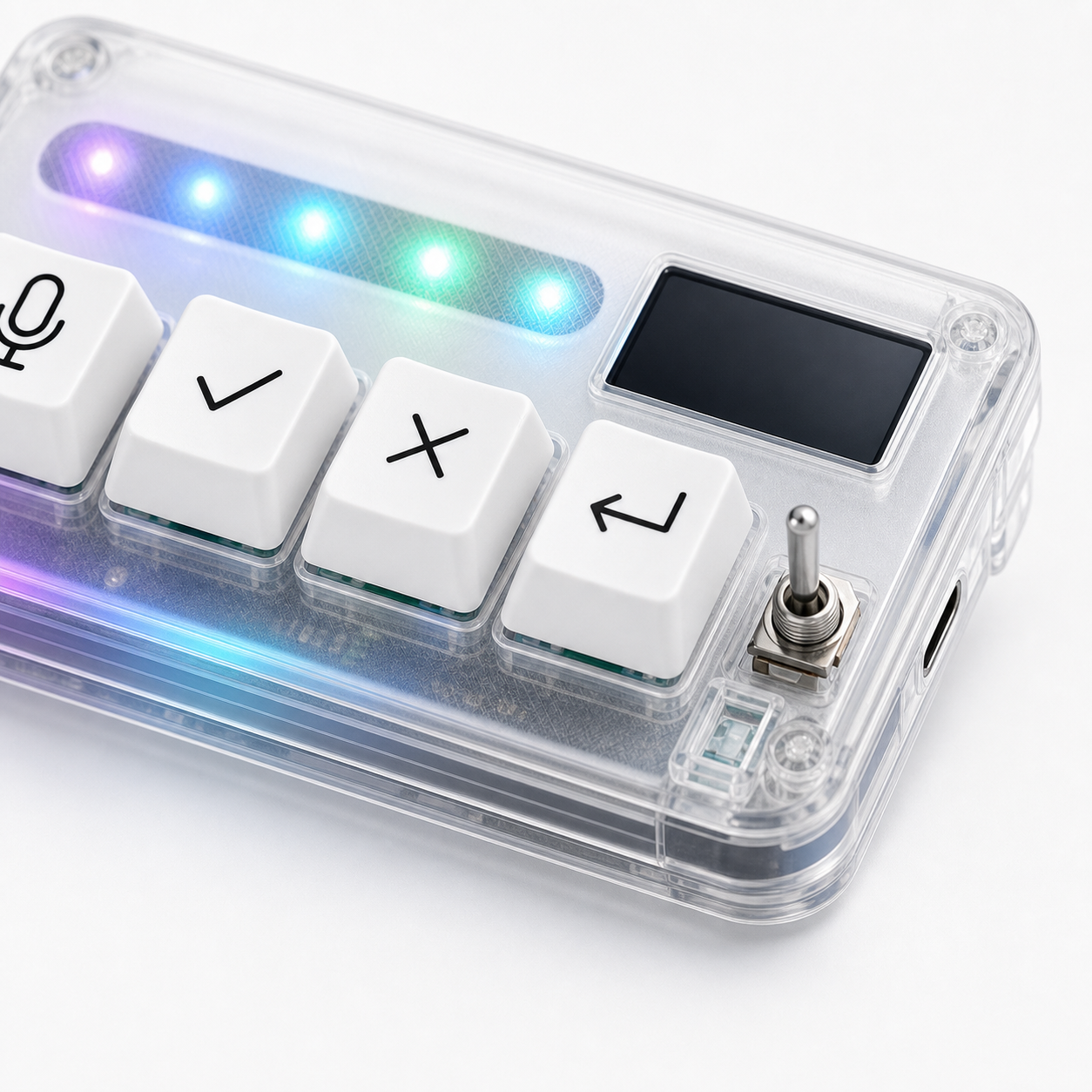
HarnessKeys includes a custom status screen alongside four physical keys for microphone, approve, cancel, and return-style actions. The device also supports USB and Bluetooth and includes an RGB light bar. That combination makes the screen more useful because connection and workflow state are part of the product’s daily use.
The screen should be seen as support for the AI control loop. It helps the user understand the device state while the physical keys handle repeated actions.
If you are comparing AI keypads, do not ask whether a screen is impressive. Ask whether it lowers uncertainty during real work. For a compact option with a status screen, review the HarnessKeys product page, then check payment methods and shipping delivery if you decide to buy.
