
Workflow Design
How to Keep Vibe Coding From Becoming Chaotic
Jun
Vibe coding becomes chaotic when speed outruns discipline. The AI answers quickly, the developer keeps prompting, changes pile up, and after an hour nobody is quite sure which decisions were good. The tool did not necessarily fail. The workflow lost its checkpoints.
The fix is not to slow everything down. The fix is to add small gates: set boundaries before the task, approve only after review, cancel when the path drifts, keep a lightweight record, and end with a real check of what changed.
Set boundaries before the first prompt
Every AI coding session should begin with a boundary. What files or modules are in scope? What behavior must stay the same? What should the agent not touch? Which output do you want first: explanation, plan, patch, or tests?
Boundaries turn vague prompting into directed work. Instead of “fix checkout,” try “inspect the failed checkout test, explain the cause, and do not edit payment provider code until I approve the plan.” That gives the AI a lane.
When the lane is clear, it is easier to notice when the agent leaves it.
Boundaries also make the next prompt easier. If the AI ignores one, you can correct it directly: “You changed provider code. Revert that direction and stay inside the test fixture.” Without a boundary, the correction becomes vague frustration.
Use approve gates deliberately
An approve gate is a moment when the developer decides the AI’s output can move forward. It might happen after an explanation, a proposed plan, a small diff, or a test result. The gate matters because it prevents the session from becoming one long uncontrolled generation.
Fast approvals are fine for low-risk work. Larger changes need deeper review. The rule is not “approve slowly.” The rule is “approve with the amount of attention the change deserves.”
A physical approve key can make the accepted step feel concrete, especially when paired with the habit of reading first.
One practical gate is to require a quick file-count check before approving. If the AI touched one expected file, continue. If it touched six files when you asked for a narrow fix, stop and inspect before moving forward.
Use cancel gates without apology
A cancel gate is the opposite checkpoint. It says this direction should stop. Maybe the AI misunderstood the task, touched the wrong area, or started solving a bigger problem than requested. Cancel early, then correct the prompt.
People sometimes hesitate to cancel because the output looks almost useful. That is how chaos grows. Almost useful work can still pull the session away from the goal.
Cancel is not wasted time. It is a way to keep the next ten minutes from being wasted.
Keep a lightweight trail
You do not need a heavy process for every AI session, but you do need enough memory to know what happened. For a small task, the git diff and test output may be enough. For a larger task, keep a short note: goal, boundary, accepted changes, rejected direction, remaining risk.
This trail helps when the session gets interrupted. It also helps you review whether the AI actually solved the problem or just produced confident motion.
If the tool can summarize what changed, use that as a draft, not as proof. The developer still needs to verify the real state.
For longer sessions, a small written note can prevent rework: original goal, accepted approach, rejected approach, test still missing. It takes less than a minute and saves you from asking the AI to rediscover the same context later.
End with review, not relief
The end of a vibe coding session is where mistakes often hide. The agent says the work is done, the code looks plausible, and the developer is relieved. That is exactly when a final review matters.
Run the relevant test or at least inspect the changed files. Compare the result to the original boundary. Did the agent keep scope? Did it add new assumptions? Did it leave TODOs or dead code? Did the fix solve the user’s actual problem?
Do not end because the AI stopped talking. End because the work is verified enough for the task.
Let hardware support the checkpoints
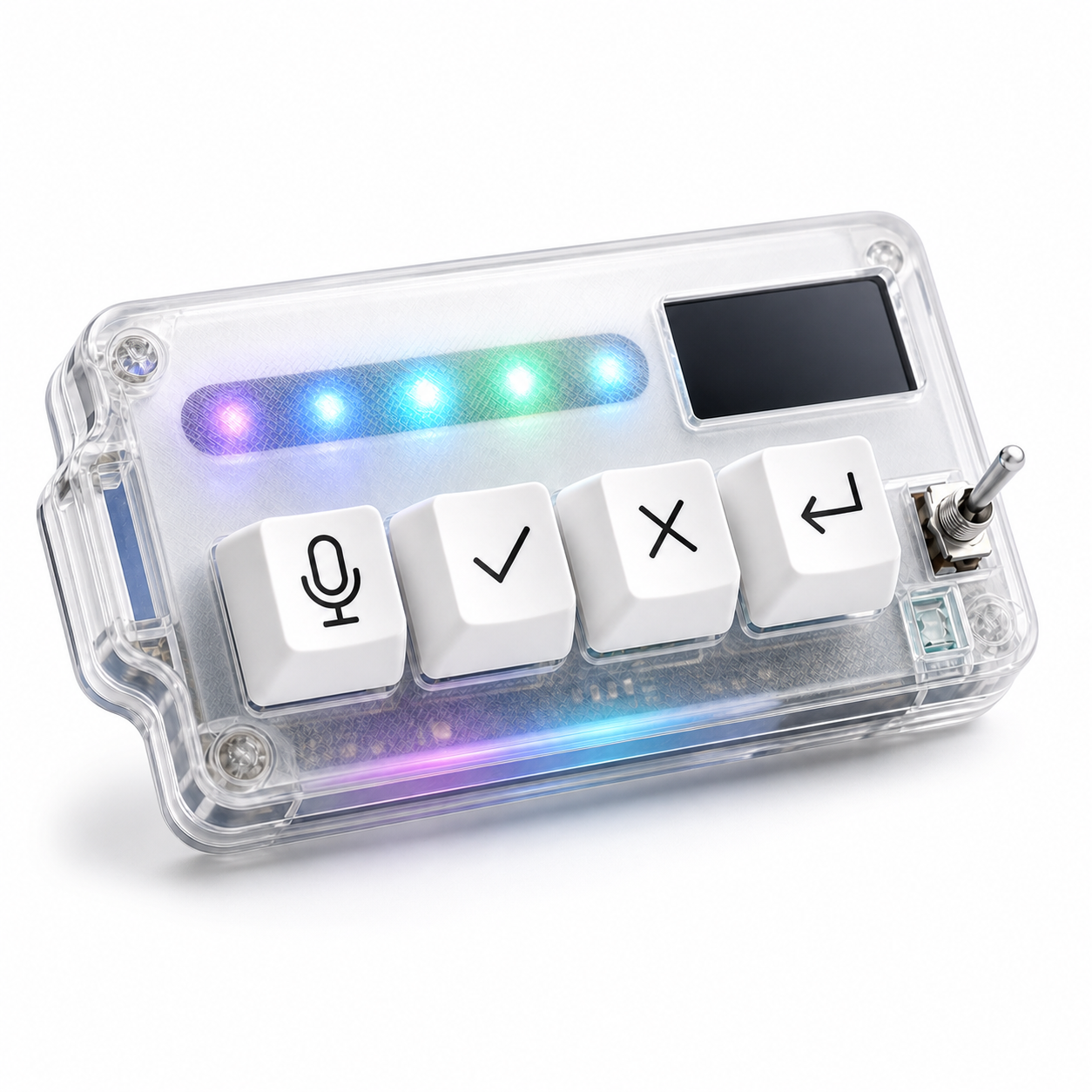
Physical controls can help if they reinforce the gates. A microphone key starts a clearer prompt. An approve key marks accepted work. A cancel key stops drift. A return-style key moves the workflow to the next turn after the developer decides.
Hardware cannot create discipline by itself. If you approve everything, a key only helps you approve faster. But when the workflow already has gates, a small keypad makes the gates easier to use without hunting through the interface.
HarnessKeys is shaped around that checkpoint loop. It includes four physical keys for microphone, approve, cancel, and return-style actions, plus USB and Bluetooth support, a custom status screen, and an RGB light bar.
Vibe coding should feel fluid, not uncontrolled. Set the lane, approve reviewed steps, cancel bad direction, keep a small trail, and finish with verification. If those checkpoints repeat in your AI workflow, the HarnessKeys AI Workflow Keypad gives them a physical place on the desk.
